What to Do With Your Books After Tax Season: A Small Business Owner's 30-Day Reset Plan


Tax season just ended. You filed, you survived, and right now you probably want to forget bookkeeping exists for a few months.
I get it. I've been doing this for years — helping small business owners and Amazon sellers clean up their finances — and I know exactly how that post-April-15 exhale feels.
But here's the truth nobody tells you: the 30 days after tax season are the most valuable bookkeeping window of the year. Your pain points are fresh. You remember exactly what was missing, what was messy, and what cost you money. If you act now, next April looks completely different.
Here's your 30-day reset plan.
Organize Your Receipts and Records
Start with the mess. Every small business owner I've worked with has some version of the same problem: receipts in three different places, bank statements downloaded to a folder called "Tax Stuff 2025," and a vague memory of expenses they meant to track but didn't.
This week, do one thing: create a single folder system and move everything into it.
Digital receipts go in Google Drive or Dropbox, organized by month and category — Office, Travel, Meals, Software, Inventory. Physical receipts get scanned (your phone camera works fine) and uploaded to the same place. Then delete or shred the originals.
The IRS requires you to keep records for at least three years. Build the habit now so you're not scrambling again next April.
Reconcile All Accounts
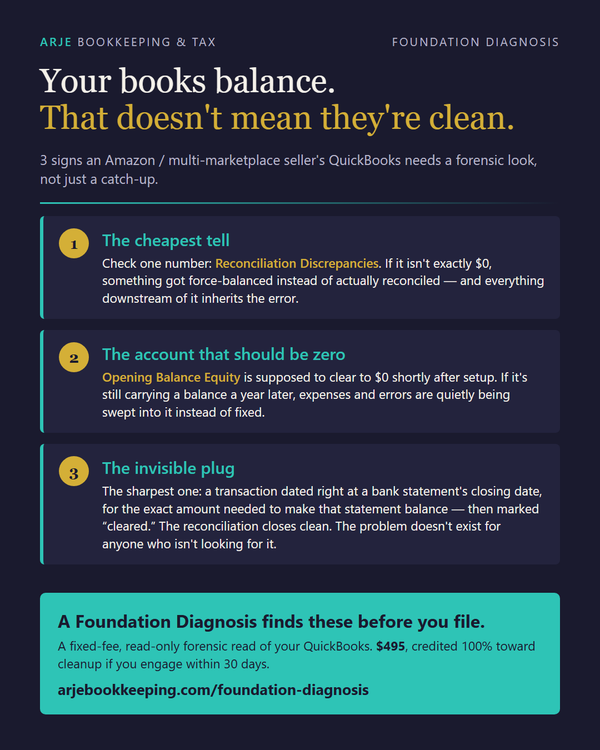
Reconciliation is the process of matching your bookkeeping records to your actual bank and credit card statements. If they don't match, something's wrong — a missing transaction, a duplicate entry, or an expense that was never recorded.
Most small business owners skip this step during the year and then pay their accountant to untangle it at tax time. That's expensive and avoidable.
Log into your bookkeeping software — QuickBooks, Wave, or even a Google Sheet — and reconcile every account for January through March. Look for:
- Transactions that were never categorized
- - Duplicate entries from bank imports
- - Personal expenses mixed in with business ones
- - Payments you made but never recorded
This process takes a few hours the first time. After that, if you do it monthly, it takes 20 minutes.
Set Up Quarterly Estimated Tax Payments
If you're self-employed or running a small business, you owe estimated taxes four times a year. Missing these payments means penalties — and a much larger bill when April comes around again.
The next estimated tax payment for Q1 2026 is due June 16, 2026. Set a calendar reminder now.
A simple rule of thumb: set aside 25–30% of every payment you receive into a separate savings account and treat it as untouchable. When the quarterly deadline hits, you pay from that account. No surprises.
If you're an Amazon FBA seller, this is especially important — your profit margins can look healthy until FBA fees, storage costs, and returns eat into them. Know your real numbers before you set your estimate.
Automate Your Bookkeeping for Next Year
The biggest thing I've learned from years of working with small business owners is this: the problem isn't discipline. It's friction. When bookkeeping requires effort, it doesn't get done.
Remove the friction.
Connect your bank accounts to your bookkeeping software so transactions import automatically. Set up a dedicated business email address for all receipts and invoices. Use a tool like Zapier to auto-file email receipts to a Google Drive folder. Schedule a 15-minute weekly bookkeeping block on your calendar — same day, same time, every week.
If you sell on Amazon, track your COGS by SKU from day one. Guessing your cost of goods sold at tax time is one of the most expensive mistakes FBA sellers make. The FBA COGS Calculator at arjebookkeeping.gumroad.com/l/bxchz ($19) is built specifically for this — it calculates your real margin after FBA fees, storage, and returns so you always know where you stand.
Start With a Checklist
I built a simple tool for exactly this moment: the Post-Tax Season Bookkeeping Reset Checklist — 20 specific action items to complete in the next 30 days, organized into the same sections above.
It's printable, practical, and takes the guesswork out of where to start.
Download it at arjebookkeeping.gumroad.com/l/gbbrci — $9, instant download.
The business owners who use the weeks after tax season to reset are the ones who send me a message in March saying "this year was so much easier." That can be you.
— Arnold Dizon
ARJE Bookkeeping & Tax Services | Henderson, NV
arjebookkeeping.com
Frequently Asked Questions
Q: How long do I need to keep business receipts after filing my taxes?
A: The IRS generally requires you to keep records for at least three years from the date you filed your return. For business assets like equipment, keep records for as long as you own the asset plus three years. When in doubt, keep it longer.
Q: What happens if I miss a quarterly estimated tax payment?
A: You'll owe an underpayment penalty, calculated based on how much you owed and how late the payment was. It's usually a small percentage, but it adds up — and it's entirely avoidable by setting aside 25–30% of income as you earn it.
Q: Do Amazon FBA sellers need to track bookkeeping differently than other small businesses?
A: Yes. FBA sellers have unique cost categories — cost of goods sold, FBA fulfillment fees, storage fees, returns, and reimbursements — that don't fit neatly into standard bookkeeping templates. Tracking these separately from the start gives you an accurate profit picture and makes tax filing significantly easier.