The Complete FBA Reimbursement Audit Guide (2026 Edition)
Amazon owes the average FBA seller $2,400 a year. Most never collect it. Here's the complete 5-step reimbursement audit under the new 60-day rules — with exactly which reason codes to filter, how to pair-check M/F entries, and how to dispute low auto-reimbursement valuations.

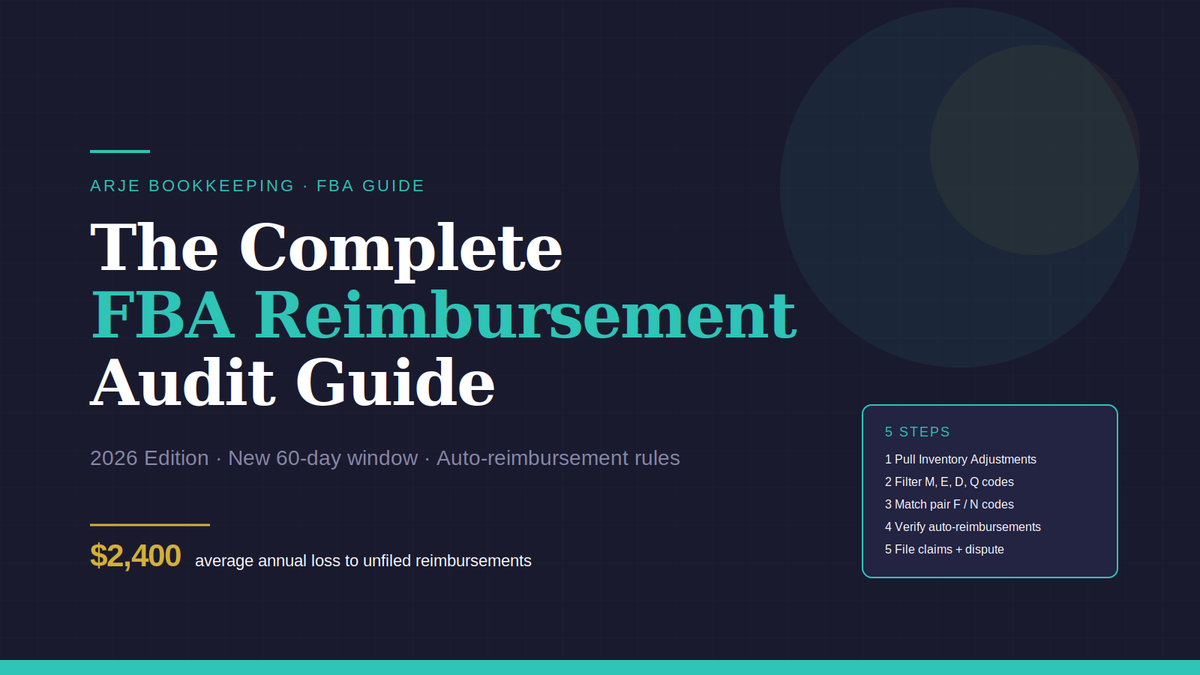
Amazon owes the average FBA seller $2,400 a year. Most never collect it. Here's how to run a proper reimbursement audit under the new 60-day rules — the same process I built into a calculator after watching sellers lose thousands to expired claims.
What Changed in November 2024 (And Why Most Sellers Missed It)
If you're still working off the old "you have 18 months to file an FBA reimbursement claim" advice, you're already behind.
Amazon quietly restructured its reimbursement policy on November 1, 2024. Two big shifts:
1. The filing window collapsed from 18 months to 60 days.
You now have 60 calendar days from the date an inventory adjustment is logged to file a claim. Miss the window, and the money is gone. Permanently.
2. Amazon started auto-reimbursing certain losses.
Some claims — primarily items lost in fulfillment centers — are now processed automatically. Sellers no longer need to manually file for those specific cases. But here's the catch: the auto-reimbursements are calculated by Amazon, not by you. And they usually use conservative valuations.
These two changes combined mean the game has shifted. The money isn't in "filing claims" anymore — it's in verifying Amazon paid correctly, filing the claims they missed, and disputing low valuations.
That's what a proper reimbursement audit actually does now.
Who Should Run This Audit
If you're moving more than 500 units per month through Fulfillment by Amazon, you're losing reimbursement money. Industry data suggests the average loss runs between 1–3% of gross revenue — which hits the ~$2,400 annual figure for a moderately active seller and scales proportionally higher as volume grows.
If you haven't built a systematic view of your FBA cost structure yet — referral fees, fulfillment fees, storage fees, long-term storage — the reimbursement audit is going to feel overwhelming. Start there first. Our FBA bookkeeping knowledge base covers those fundamentals in plain English. For the full method — settlements, COGS, fees, reimbursements, and taxes — see the complete guide: Amazon FBA Bookkeeping: The Complete Guide.
The sellers who most need this audit:
- Brands running 3+ SKUs with any warehouse transfers
- Sellers using removal orders regularly
- Anyone whose inventory has sat in Amazon fulfillment centers longer than 90 days
- Sellers who've never run a reimbursement audit before (low-hanging fruit is usually 3–6 months of unclaimed adjustments)
If you're a single-SKU seller doing under $10K/month, the ROI on this audit is smaller but still positive. If you're running a multi-SKU brand doing $50K+/month, this audit likely finds $500–$3,000 in a single pass.
The 5-Step Reimbursement Audit Process
This is the exact process I run. It takes 4–6 hours manually for a typical account. Faster if your volume is low; slower if you have years of unaudited history.
Step 1: Pull Your Inventory Adjustments Report
Where: Seller Central → Reports → Fulfillment → Inventory Adjustments
Format: Download as CSV (not TSV, not PDF)
Date range: Set to the last 60 days only
This is the critical first step that most seller guides still get wrong. Under the old 18-month window, pulling a year-and-a-half of data made sense. Under the new rules, anything older than 60 days is already expired — filing claims against expired adjustments is a waste of time and may flag your account for submitting invalid claims.
Pull the 60-day report, rename the file with today's date, and save it to a dedicated reimbursement folder. You'll want an audit trail.
Step 2: Filter for Reason Codes M, E, D, and Q
Open your CSV. You'll see a "reason" column with single-letter codes. Ignore everything except these four:
- M = Misplaced — Amazon can't find your inventory
- E = Damaged at fulfillment center — damaged in Amazon's care
- D = Disposed — Amazon disposed of the unit (with or without your authorization)
- Q = Disposition change — unit changed status, often without a paired recovery
These four codes cover the vast majority of reimbursement-eligible events. Other codes exist (like N for "found" or P for "disposition change completion"), but those are informational or paired with the four above.
Use your spreadsheet's filter function to isolate only rows with M, E, D, or Q in the reason column. Everything else is noise for this audit.
Step 3: Match M Codes Against F or N Codes (The Pair Check)
This is the step most sellers skip — and it's the difference between a professional audit and an amateur one.
Amazon logs inventory events in pairs. When a unit goes missing, you see an M (Misplaced) entry. When they find it again, you see an F (Found) or N (Found — post-reimbursement) entry that offsets the M.
If an M has a paired F or N, Amazon found the unit. No reimbursement is owed. Filing a claim here wastes your time and wastes Amazon's review time (which hurts your account's claim credibility).
If an M has no pair, the unit is still missing. This is a valid reimbursement claim.
To run the pair check, sort your filtered CSV by SKU and date. For each M entry, look for a matching F or N entry for the same SKU within a reasonable window. Modern spreadsheet tools like Excel and Google Sheets can automate this with VLOOKUP or INDEX/MATCH formulas.
This cancellation pass typically removes 40–60% of your raw M-code list. What remains is your actual claimable inventory.
Step 4: Cross-Check Amazon's Auto-Reimbursements
Since November 2024, Amazon's system auto-reimburses certain fulfillment center losses. Before you file any manual claims, you need to know what Amazon already paid you — and whether they paid correctly.
Where: Seller Central → Reports → Payments → Transaction View
Filter: Transaction type = "FBA Inventory Reimbursement"
Date range: Match your audit window (60 days)
For every auto-reimbursement Amazon has already issued, verify:
- The quantity matches your records
- The reimbursement value matches the expected retail value
- The affected SKU matches the inventory adjustment
Amazon pays at retail value by default — their retail value. Not yours. Not replacement cost. Not wholesale. If an item sold at a 20% discount during a promotional period, Amazon may reimburse based on that discounted value rather than your standard retail price.
Flag any auto-reimbursement that's below your expected value. These are disputable, and Step 5 is where you recover the difference.
Step 5: File Remaining Claims and Dispute Low Valuations
For every unclaimed and unpaired inventory loss from Steps 2 and 3, file a reimbursement case through Seller Central:
Where: Seller Central → Help → Get support → Selling on Amazon → Fulfillment by Amazon → Inventory → Lost or damaged inventory
File one case per incident. Include:
- Transaction Item ID from the Inventory Adjustments report
- SKU and FNSKU
- Date of adjustment
- Quantity affected
- Your cost basis documentation (invoices, PO copies, wholesale receipts)
For auto-reimbursements you flagged in Step 4, file a dispute case citing the original reimbursement case ID and attaching cost-basis proof. Amazon's default is retail value, but if you provide your actual unit cost (typically higher than their retail calculation for wholesale or private-label sellers), they'll often adjust upward.
The recovery uplift from disputing low valuations is typically 10–30% of the original reimbursement amount — on top of what Amazon already paid automatically.
How Long Does This Take?
A thorough manual audit for a brand running 10–20 SKUs:
- Step 1 (pull reports): 10 minutes
- Step 2 (filter codes): 20 minutes
- Step 3 (pair check): 2–3 hours (this is the slowest step)
- Step 4 (cross-check auto-reimbursements): 1 hour
- Step 5 (file claims and disputes): 1–2 hours
Total: 4–6 hours for a complete pass.
The pair check in Step 3 is where most sellers burn the most time, especially if they're matching manually instead of with spreadsheet formulas. It's also where most sellers make errors — either missing legitimate claims or filing against already-found inventory.
What You Shouldn't Do
Don't outsource to reimbursement services that take 11–25% of your recoveries. Services like GETIDA and Eva charge a percentage of the money they recover. For a seller doing $50K/month who finds $3,000 in unclaimed reimbursements, that's $330–$750 paid out for a process that takes 4–6 hours.
Those services exist because the process is tedious, not because it's complex. Once you've done it twice, it's repeatable.
Don't file claims against expired adjustments. Filing claims against items outside the 60-day window clutters your case history and can reduce Amazon's responsiveness to legitimate future claims. Stick to the window.
Don't skip Step 3. This is where the amateur audits trip. Filing against already-found inventory gets your cases auto-rejected and trains Amazon's system to deprioritize your submissions.
Frequently Asked Questions
How much do FBA sellers typically lose to unfiled reimbursements?
Industry data from reimbursement service providers suggests 1–3% of gross revenue, with the average active FBA seller losing approximately $2,400 per year to unclaimed losses and damaged inventory.
What is the current FBA reimbursement window?
As of November 1, 2024, Amazon reduced the claim filing window from 18 months to 60 calendar days from the date of the inventory adjustment.
Does Amazon automatically reimburse all FBA losses?
No. Amazon auto-reimburses certain fulfillment center losses, primarily lost inventory. Damaged inventory, disposed units, and customer return discrepancies typically still require manual claims.
What reason codes indicate a reimbursable FBA event?
The four reason codes most associated with reimbursement-eligible events are M (Misplaced), E (Damaged at fulfillment center), D (Disposed), and Q (Disposition change). Codes F (Found) and N (Found post-reimbursement) are offsetting entries, not reimbursement events.
Can I dispute an FBA auto-reimbursement if I think Amazon paid too little?
Yes. Amazon's auto-reimbursement defaults to their calculated retail value. Sellers can file a dispute case with cost-basis documentation (invoices, purchase orders, wholesale receipts) to request an adjustment. Recovery uplift from disputes typically runs 10–30% above the initial reimbursement.
How often should an FBA seller run a reimbursement audit?
Given the 60-day filing window, monthly audits are the minimum for active sellers. Weekly audits are recommended for sellers moving more than 5,000 units per month. Quarterly audits are insufficient under the new rules.
Run the Audit Yourself — Or Use the Tool I Built
Everything above is the exact process. You can run it manually using any spreadsheet tool. It works, it's legitimate, and it's how professional reimbursement audits have always been conducted.
After doing this manually for clients for too many billable hours, I built it into a single-file HTML calculator. Paste your CSV, it runs Steps 2 through 5 in about 60 seconds. No subscription, no percentage-of-recovery fee, no data leaving your browser.
FBA Reimbursement Calculator — $19.99, one-time
If you're moving any real FBA volume, it pays for itself on the first claim it finds. Full tool details are on the calculator page.
Either way — manual or automated — the goal is the same: stop leaving reimbursement money on the table before the 60-day window expires.
ARJE Bookkeeping & Tax Services helps ecommerce sellers and service-based small businesses automate their back office. For free Amazon FBA bookkeeping guides, see kb.arjebookkeeping.com. For templates and calculators, visit arjebookkeeping.gumroad.com.